WhatsApp API
How Meta Tech Providers Work for WhatsApp Business
Understand Meta Tech Providers, Solution Partners, Embedded Signup and what to verify before connecting your WhatsApp business number.
By the Social Connect team · · 5 min read
If you are choosing a WhatsApp CRM or broadcast tool, the provider's Meta status tells you how it connects your number and who controls your data. Here is what a Tech Provider is, how it differs from other kinds of WhatsApp tools, and how to verify any provider before you connect your business number.
What a Meta Tech Provider is
Meta runs the WhatsApp Business Platform (the Cloud API) for companies that build software on top of WhatsApp. A Tech Provider is a software company that Meta has approved to connect other businesses to that platform. To become one, a company has to:
- verify its own business with Meta;
- pass Meta's app review for the WhatsApp permissions it uses, such as sending messages and managing WhatsApp Business Accounts;
- onboard customers through Embedded Signup, Meta's own sign-in window, rather than asking for passwords or QR codes.
In short, Meta has checked who the provider is and what its app does with WhatsApp, and every business it connects goes through Meta's own flow.
Tech Provider, Solution Partner and unofficial tools
| Meta Tech Provider | Meta Solution Partner (BSP) | Unofficial tool | |
|---|---|---|---|
| Uses the official WhatsApp API | Yes | Yes | No (WhatsApp Web or app automation) |
| Approved by Meta | Yes | Yes | No |
| How you connect | Embedded Signup | Embedded Signup or managed setup | QR code or phone login |
| Who bills WhatsApp message fees | Meta, directly to you | Meta or the partner | Not applicable |
| Risk of a ban for the tool itself | No | No | High |
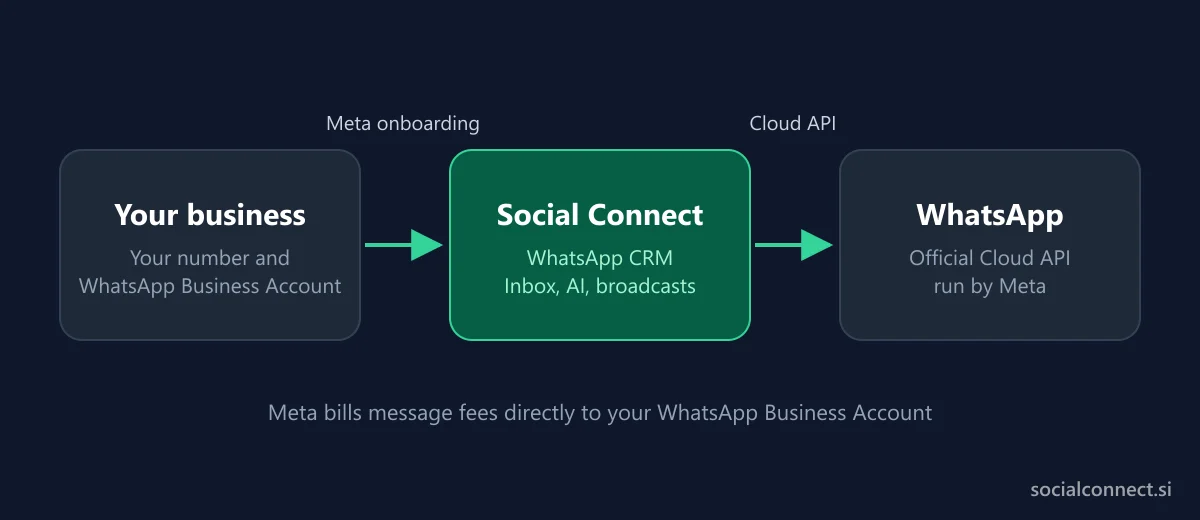
Tech Providers and Solution Partners are both on the official platform. The main practical difference is often billing: with many Tech Provider arrangements, Meta charges message fees to your own WhatsApp Business Account. Unofficial tools are a different category altogether. We explain why in official vs unofficial WhatsApp tools.
What it means for your business
- Your number is safe to use. Messages go through Meta's Cloud API, so WhatsApp has no reason to ban you for the software you use.
- You own the account. Your WhatsApp Business Account, number and templates live in your own Meta Business portfolio. You can remove a provider's access there at any time.
- Understand who bills you. Ask whether Meta bills WhatsApp fees directly or whether a Solution Partner bills them. Any service or campaign management fee should be agreed separately. See how WhatsApp pricing works.
- Every official feature. Approved templates, broadcasts, interactive buttons, catalogs, WhatsApp Pay and WhatsApp calling all work, because they are part of the platform, subject to your account's eligibility and Meta's current availability.
- Embedded Signup. An approved provider can connect your number through Meta's own signup flow and help with business verification.
How to check a WhatsApp provider is genuine
- Look at the connect screen. A genuine provider opens a Facebook window (Embedded Signup) to connect your number. If it asks you to scan a QR code, it is not using the API.
- Check your Meta Business settings. After connecting, your WhatsApp Business Account should appear under your own business at business.facebook.com, with the provider's app listed under connected apps.
- Look for a display name review. On the official API, Meta reviews your display name and you get a quality rating and messaging limits.
- Ask who bills message fees. A clear answer such as “Meta bills you directly” is a good sign.
Getting started with Social Connect
Social Connect is a WhatsApp CRM for Indian businesses, designed for Meta's official WhatsApp Business Platform. It gives your team a shared inbox, AI assistance, broadcasts, catalog orders and payments. Production onboarding is enabled only after Social Connect's own Meta app and required permissions are configured. See plans and pricing.
Frequently asked questions
Does using the Cloud API automatically make a CRM a Meta Tech Provider?
No. A company must verify its business, configure its own Meta app, pass the required app review and receive the relevant permissions before it can make that claim.
What is the difference between a Meta Tech Provider and a BSP?
Both use the official WhatsApp Business Platform. A Tech Provider builds software and onboards businesses with Embedded Signup, and each business pays Meta directly for its messages. A Meta Business Partner (Solution Partner, often called a BSP) can also bill message fees to the business on Meta’s behalf.
Who owns my WhatsApp Business Account?
You do. The WhatsApp Business Account and phone number should stay in your own Meta Business portfolio. A provider receives limited permissions, which you can remove in Meta Business settings.
Who bills WhatsApp message fees?
It depends on the provider arrangement. Meta may bill the business directly, while a Solution Partner may bill on Meta's behalf. Ask for the billing model and every service fee in writing before onboarding.
Can an official API number still be restricted?
Yes. Meta can limit any number for policy violations, poor quality or messages sent without valid opt-in. Official API access does not remove the obligation to follow WhatsApp’s messaging policies.